


Accept crypto with CoinGate
Accept crypto with confidence using everything you need in one platform.
How to Sell Crypto and Get Money to Your Card
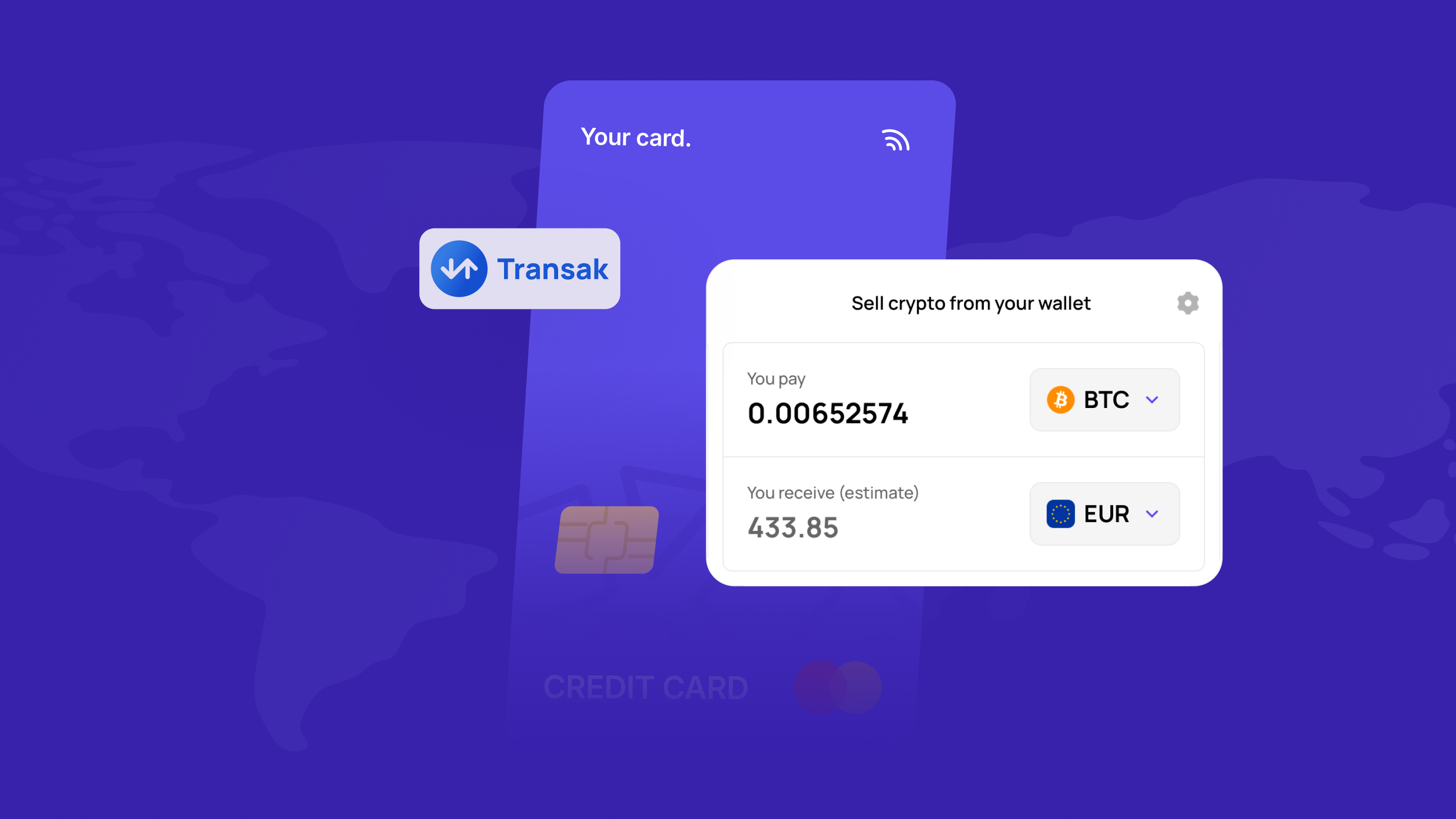
Selling crypto for cash sounds simple on paper. Click sell, get money, done.
In reality, most people hit friction somewhere in the middle. They jump between platforms, try to figure out payout methods, deal with jargon, or stop to wonder whether they’re about to send funds the wrong way.
A cleaner flow fixes that.
At CoinGate, the process starts on the Sell page, where a Transak-powered widget handles the entire off-ramp. You choose what you want to sell, enter the amount, add your Visa or Mastercard, and receive cash straight to your card.
If that’s what you came here for, let’s walk through the steps.
Just want to get this done? Go straight to the Sell page.
What you need before you sell crypto
Before you start, have a few basics ready.
1. The crypto you want to sell
This part is obvious, but it still matters. Make sure you know which asset you’re selling and roughly how much of it you want to convert.
2. A Visa or Mastercard
Payouts go directly to your debit or credit card. Only Visa and Mastercard are accepted. There are no bank transfers and no other card networks. Have a valid card ready before you start.
3. The right personal details
Selling crypto for cash requires identity verification. Transak handles KYC, AML, and compliance checks as part of the sell flow. First-time users will be prompted to complete verification before proceeding. For smaller off-ramp transactions in some supported markets, a lighter KYC process may apply.
That covers the basics. Once you have these ready, you can move forward with the actual sell flow.
How the CoinGate and Transak sell flow works
The flow starts on the CoinGate Sell page and continues through the Transak widget embedded on that page.
You choose the cryptocurrency you want to sell and the amount. Then you move into the sell flow, where you enter your Visa or Mastercard details, complete verification if needed, review the transaction, and confirm it.
This is the point of using an off-ramp partner in the first place. You don’t want to figure out five different steps across five different tools. You want one guided process that takes you from crypto to cash on your card without unnecessary detours.
The off-ramp flow handles everything in one place, from choosing the asset to receiving fiat on your card, without extra complexity or technical jargon.
Step 1: Choose the crypto you want to sell
The first step is deciding what you’re selling.
This could be Bitcoin, Ethereum, Litecoin, USDC, Solana, AVAX, or another supported asset. Over 40 tokens are available for selling, with infrastructure spanning multiple blockchains and fiat currencies.
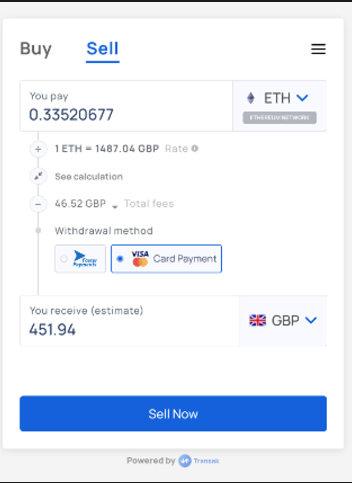
Once you know the asset, enter the amount you want to sell.
At this stage, keep one thing in mind: selling crypto is about more than just the coin. It’s also about what you want to receive on the other side. The amount, the card you’re receiving to, and fees all play a role together.
Step 2: Add your Visa or Mastercard
After entering the crypto amount, you need to add your card details.
Payouts go directly to your Visa or Mastercard, debit or credit. No bank transfers are available. You’ll need to enter your card number, CVV, and expiration date. The billing address country and card-issuing country must both be eligible for off-ramp payouts.
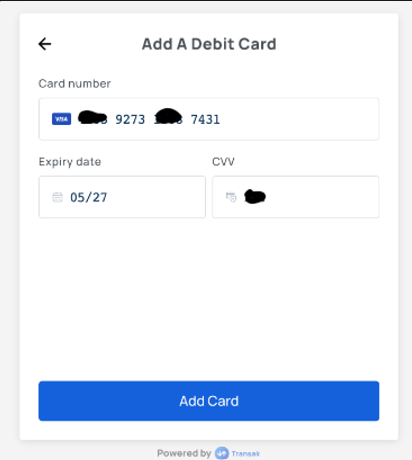
A card verification step is part of the process. A zero-dollar ($0) transaction is conducted through 3DS authentication by your bank to verify the card. If you’ve used the flow before, your previously added cards will appear so you can select one or add a new card.
For most users, this is the real finish line in sight. You’re not selling crypto for the sake of seeing a number on a screen. You’re selling because you want money to land on your card.
Step 3: Enter the required details carefully
Next comes the practical part.
You provide the information needed to complete the transaction, including your card details, personal information, and any other fields required by the flow.
This is where people tend to rush. They shouldn’t.
Take your time and check:
- the amount you’re selling
- the card you’re receiving to
- whether the card details are correct
- any wallet or transfer instructions shown in the flow
This is a money movement step. A small mistake here can create a bigger problem later.
Step 4: Complete verification if needed
Depending on the transaction, you may need to verify your identity.
That’s not unusual. It’s part of the process when fiat rails, compliance checks, and fraud prevention all meet in one place. The off-ramp flow includes built-in KYC, AML, and risk controls. First-time users on Transak will be prompted to complete KYC before proceeding.
Some users may go through a lighter process for smaller transactions in supported regions. Others may need a fuller verification flow. It depends on the amount, jurisdiction, and the risk profile of the transaction.
The way to think about it is this: verification isn’t there to slow you down. It’s there because turning crypto into fiat touches real banking and card infrastructure.
Step 5: Review and confirm the transaction
Before the sale goes through, review everything.
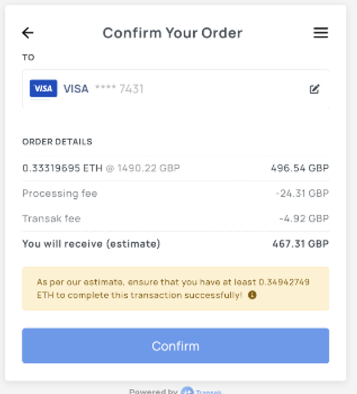
The flow makes this its own step, and that’s a good thing. This is where you slow down and check:
- the crypto asset is correct
- the amount is correct
- the card is correct
- the destination details are correct
- the final payout looks reasonable
You’ll also need to confirm a risk disclaimer and click “I Understand the Risk” before proceeding.
This is also where fees come into view. The final order summary includes the payout fiat currency, expected fiat amount, crypto amount, and total fees. Review these before confirming.
A quick review now is better than regret later.
Step 6: Send crypto and receive cash on your card
Once you confirm the transaction, you’ll be shown a wallet address. Send your crypto to that address, and once the transaction is confirmed on the blockchain, the fiat payout is processed to your card.
That’s the whole point of the flow. Crypto out, cash on your card.
The exact timing can vary. Some transactions move faster than others depending on card type, region, verification status, and processing conditions. However, the structure is simple enough to follow once you know the steps.
Why people sell crypto for cash
There are a few obvious reasons.
Sometimes you want to lock in gains. Sometimes you need money on your card rather than in a wallet. Sometimes you’re done waiting and want to turn digital assets into something you can actually spend.
Whatever the reason, it comes down to one thing: you hold crypto and you want fiat. The path between the two should make sense.
The off-ramp flow on CoinGate is built around that use case. It lets you sell crypto and receive fiat directly to your Visa or Mastercard, without app switching or extra steps.
Why this sell flow is easier than doing it the hard way
A lot of users still think selling crypto for cash means stitching together too many moving parts.
Swap the asset. Bridge it if needed. Move it to another platform. Sell it. Withdraw it. Hope nothing gets stuck in the middle.
The off-ramp flow is meant to cut through all of that. The typical problems with selling crypto, things like high drop-off, multiple fees, app switching, and confusing terminology, don’t apply here because everything stays inside one guided flow. You sell, and the fiat goes to your card.
That’s the value here. Less time wasted, and more clarity over where your money is going.
Common issues when selling crypto for cash
Even in a cleaner flow, a few things can still go wrong.
1. Verification takes longer than expected
This happens sometimes. Documents may need manual review. Certain transactions may trigger extra checks. That doesn’t always mean there’s a problem. It often just means the transaction needs another layer of confirmation. KYC verification can involve multiple stages rather than being instant every time.
2. The card is not eligible
Only Visa and Mastercard debit or credit cards are accepted. If you try to add any other card type, you’ll get an error. Even after card verification, some cards may not meet the requirements for off-ramp payouts. In that case, the flow will show an in-app error explaining the card is not eligible.
3. The payout details are wrong
This one is on the user more often than the system.
If the card details are wrong, the payout may fail or get delayed. That’s why checking the card information matters as much on the sell side as checking wallet details on the buy side.
4. The order stays in processing for a while
Orders can move through different states such as PROCESSING, PENDING_DELIVERY_FROM_TRANSAK, COMPLETED, FAILED, CANCELLED, or EXPIRED. That means some waiting in the middle is normal, especially when checks or transfer steps are still underway.
5. The final payout is lower than expected
This usually comes down to fees, exchange rate movement, or processing conditions. That’s why the review step matters. Don’t just click through. Read the numbers first.
Is it safe to sell crypto for cash?
It can be, if you use the official flow and pay attention to the details that matter.
That means using this flow, entering the right card details, completing verification through the legitimate checkout, and reviewing the final transaction before confirming.
It also helps that Transak operates with a regulated global footprint, with registered entities in the USA, UK, Canada, Australia, Poland, India, and Hong Kong, and is ISO 27001:2022 certified and SOC 2 Type II compliant.
However, safety isn’t only about infrastructure. It’s also about behavior. Rushing through the form, ignoring the card details, or not reading the final quote is how people create avoidable problems for themselves.
Final thoughts
Selling crypto for cash shouldn’t feel like untangling a knot.
You choose the asset. You enter the amount. You add your Visa or Mastercard. You complete verification if needed. You review the transaction. And you receive fiat on your card.
That’s the flow.
With CoinGate and Transak, the goal is simple: give users a more direct path from crypto to cash, without making them fight through extra steps that add little value. The off-ramp flow keeps the entire process in one place, handles compliance and risk controls, and delivers fiat straight to your card.
Thinking it’s time to cash out crypto the simpler way? Start with us.
FAQ
How do I sell crypto for cash?
You start by choosing the cryptocurrency and amount you want to sell on the CoinGate Sell page. Then you add your Visa or Mastercard, complete verification if needed, review the transaction, and receive fiat directly to your card.
Where does the cash go after I sell crypto?
Directly to your Visa or Mastercard, debit or credit. No bank transfers are available. Only Visa and Mastercard are accepted.
Do I need to verify my identity to sell crypto?
Often, yes. The sell flow includes KYC, AML, and risk controls as part of the process. First-time users will be prompted to verify their identity. In some supported markets with smaller transactions, a lighter KYC process may apply.
What cryptocurrencies can I sell?
Over 40 tokens are supported, including BTC, ETH, LTC, USDC, SOL, AVAX, BNB, XRP, and more.
How long does it take to receive cash after selling crypto?
It depends on the card type, region, verification status, and processing conditions. Orders can move through several status stages before completion, which means some transactions may take longer than others.
Why would I use this flow instead of selling on an exchange?
Because it’s simpler for many users. The usual off-ramp headaches include app switching, extra fees, swaps, bridges, and confusing terminology. This flow reduces that friction and makes crypto-to-fiat selling more direct, from one page, straight to your card.
Accept crypto with CoinGate
Accept crypto with confidence using everything you need in one platform.