


Accept crypto with CoinGate
Accept crypto with confidence using everything you need in one platform.
How to buy crypto using Apple Pay and Google Pay
Buying crypto with Apple Pay or Google Pay takes about as long as paying for a coffee.
That’s not an exaggeration. The payment itself is a tap. The crypto arrives in your wallet within minutes. And you don’t have to type in card numbers, sort codes, or account details to make it happen.
On the CoinGate Buy page, both Apple Pay and Google Pay are available as payment methods. The buy widget is powered by Transak, and the mobile wallet option sits right alongside card and bank transfer payments.
If you already have Apple Pay or Google Pay set up on your device, here’s what the process looks like.
Wallet already set up on your phone? Buy crypto in a couple of taps.
Why buy crypto with a mobile wallet?
The appeal is convenience.
With Apple Pay or Google Pay, the payment method is already linked to your device. You don’t have to enter card details manually. You authenticate with Face ID, Touch ID, or your device PIN, and the payment is authorized.
For buying crypto specifically, this removes one of the more tedious parts of the process. Instead of pulling out a card, typing in 16 digits, adding the CVV and expiry, and then waiting for a 3DS challenge from your bank, you tap once and confirm.
Processing time sits at 1-4 minutes on the CoinGate buy widget. That’s in the same range as card payments, but with fewer manual steps on your end.
What cryptocurrencies can you buy with Apple Pay and Google Pay?
The full list of supported tokens. Apple Pay and Google Pay aren’t limited to specific coins. Whatever’s available on the buy widget is available through these payment methods.
That includes Bitcoin (BTC), Ethereum (ETH), USDC, Solana (SOL), and many others. Over 100 cryptocurrencies are supported, and the list may vary depending on your region.
How to buy crypto with Apple Pay or Google Pay
Go to the this page and follow these steps:
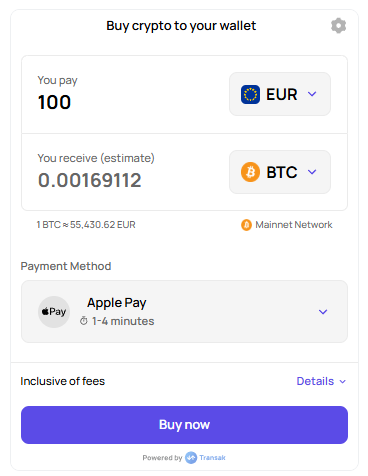
1. Select your cryptocurrency and amount
Pick the token you want to buy and enter the amount in your local currency. The widget shows the equivalent crypto amount based on the current exchange rate, with fees already factored in.
2. Choose Apple Pay or Google Pay
When the payment method selector appears, pick either Apple Pay or Google Pay depending on your device.
Apple Pay works on iPhone, iPad, Mac, and Apple Watch. It uses the cards you’ve added to your Apple Wallet.
Google Pay works on Android devices and in Chrome on desktop. It uses the cards linked to your Google account.
Both pull from an existing card, so the underlying payment still goes through Visa or Mastercard. The difference is that you don’t have to type in the card details every time.
3. Enter your wallet address
Provide the wallet address where you want to receive the crypto. This has to match the network of the token you’re buying. For example, if you’re buying Bitcoin, provide a BTC wallet address. If you’re buying ETH, provide an Ethereum address.
Check the address carefully. Crypto transactions can’t be reversed.
4. Verify your email and complete KYC if needed
Confirm your email with a verification code. Depending on the transaction size and your verification history, you may need to complete identity verification. Smaller purchases in some regions qualify for lighter KYC, while larger amounts require standard verification with an ID document and selfie.
5. Confirm the payment
This is the tap-to-pay step. For Apple Pay, authenticate with Face ID, Touch ID, or your passcode. For Google Pay, confirm through your device’s authentication method.
The payment is processed, and within 1-4 minutes, the crypto is sent to your wallet.
6. Receive crypto in your wallet
Once the payment is confirmed, the purchased cryptocurrency is delivered directly to the wallet address you provided. There’s no intermediary holding your funds. The tokens are yours as soon as they arrive.
Things to keep in mind
Your card still matters. Apple Pay and Google Pay are wrappers around your existing card. If your bank or card issuer blocks crypto-related transactions, the payment will be declined even through a mobile wallet. In that case, try a different card or switch to a direct card payment or bank transfer.
Device compatibility. Apple Pay only works on Apple devices. Google Pay only works on Android and Chrome. If you’re on a device that doesn’t support either, card payment and bank transfer are your alternatives.
Fees are included in the quote. The buy widget shows the full price before you confirm, including processing fees and exchange rate spread. What you see is what you pay.
Works across regions. Apple Pay and Google Pay are available in most regions where the buy widget operates. However, availability may depend on your country and the card linked to your mobile wallet.
Final thoughts
If speed and simplicity are what you’re after, Apple Pay and Google Pay are hard to beat for buying crypto. The payment is a tap, the processing takes minutes, and you skip the manual card entry that slows most people down.
Pick your crypto, pick your wallet payment method, and go. The CoinGate Buy page has both options ready.
FAQ
Can I buy Bitcoin with Apple Pay?
Yes. Select Bitcoin, choose Apple Pay as your payment method, and authenticate with Face ID or Touch ID. The BTC will be sent to your wallet within minutes.
Can I buy crypto with Google Pay?
Yes. Google Pay works the same way. Select your cryptocurrency, choose Google Pay, confirm through your device, and receive crypto in your wallet.
Is buying crypto with Apple Pay or Google Pay safe?
Both Apple Pay and Google Pay use tokenized card numbers and device-level authentication (Face ID, Touch ID, PIN). Your actual card number is never shared with the merchant. The buy flow is processed by Transak, which holds ISO 27001:2022 and SOC 2 Type II certifications.
How long does it take?
The full process, from selecting crypto to receiving it in your wallet, typically takes 1-4 minutes after email verification and KYC are complete.
Are there extra fees for using Apple Pay or Google Pay?
Apple Pay and Google Pay themselves don’t charge extra fees to the user. However, the payment still goes through your card network, so standard card processing fees apply. These are included in the quote shown before you confirm.
Accept crypto with CoinGate
Accept crypto with confidence using everything you need in one platform.