


Accept crypto with CoinGate
Accept crypto with confidence using everything you need in one platform.
How to Create Your First Payout Link
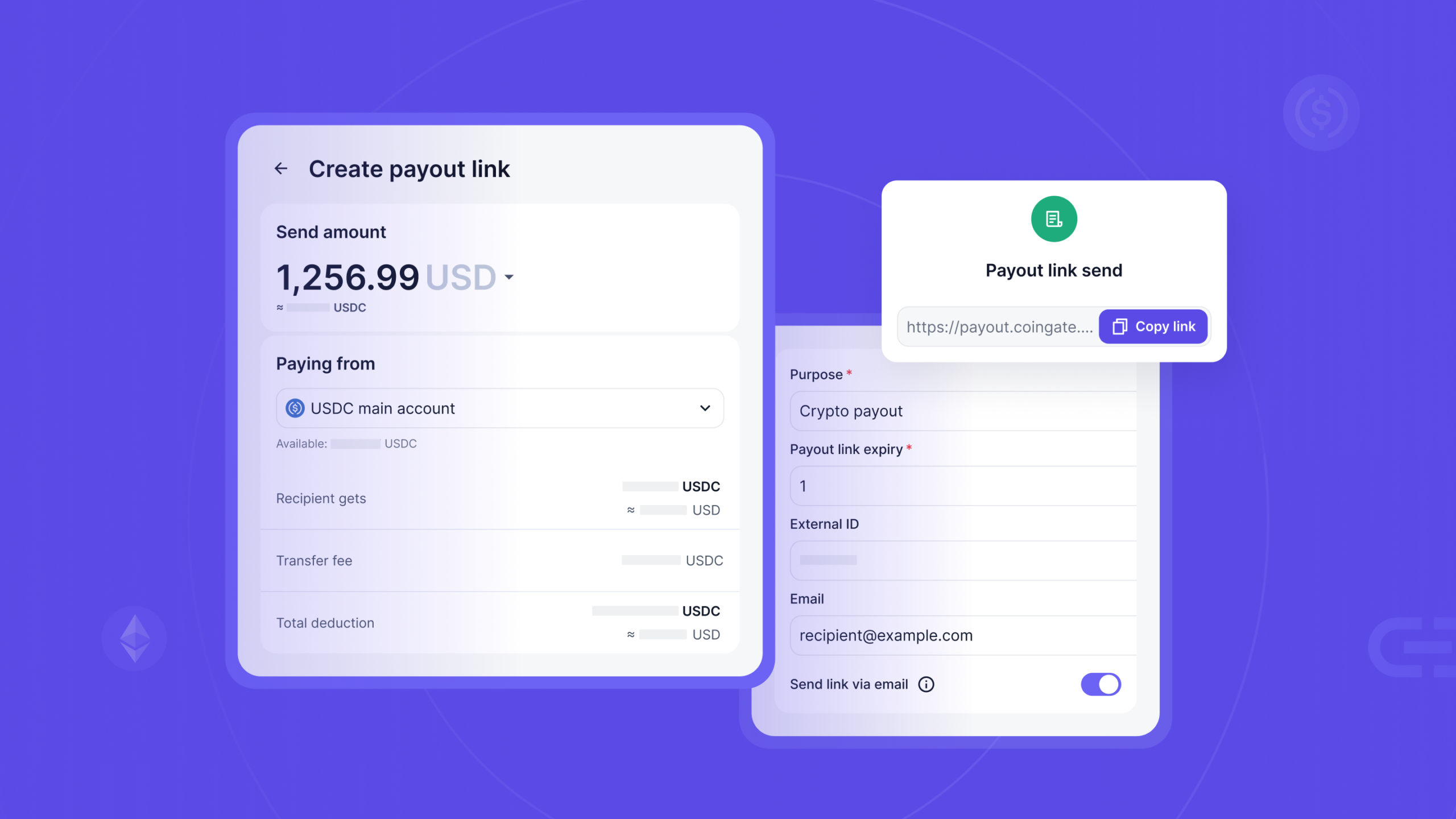
You have someone to pay and a balance to pay them from. What you do not have is their wallet address, their details, or any wish to chase them for either. A Payout Link handles exactly that. All you need about them is an email address, and creating one takes about a minute.
If you are not sure what a Payout Link is yet, start with the overview and come back. If the concept is already clear, let us build one.
Paying someone who has never touched crypto? Set yourself up with us.
Before you start
Three things have to be true.
- Crypto payouts are active on your account. A Payout Link becomes an ordinary payout the moment someone collects it, so if payouts are not switched on, the last step will not go through.
- You are an owner or an administrator. Creating payouts is limited to those two roles. Other roles can see them.
- A balance can cover it. Crypto or fiat, either is fine. It has to cover the payout amount plus fees, because both come off at creation rather than later. Balances that cannot cover it are greyed out when you go to pick one, so you find out before the recipient does.
You will find the form in the dashboard under Payouts, then Payout links, or go straight to the new link page.
Step 1: Set the amount and the currency the recipient sees
Choose how much you are paying and which currency that figure is expressed in. This is the display amount, the number the recipient reads on their screen. It does not have to be the crypto they end up with, because they pick that part themselves later.
So you can show someone €250 and fund it from a crypto balance. You can also express the amount in the same crypto you are sending, which pays it out one to one with no conversion at all.
Step 2: Pick the balance that funds it
Separate choice, and an easy one to skip past. The display currency is what the recipient sees. This is where the money actually comes from.
If the two differ, we convert the value into the currency of the balance you picked, and that converted figure plus fees is what gets debited. Fund a €250 link from a stablecoin balance and the stablecoin equivalent comes off. If you fund in fiat and the recipient wants crypto, the exchange happens when they collect.
Step 3: Write the purpose
Every link needs a reason, between 4 and 191 characters. “Q1 affiliate payout”. “Invoice 4421”. “Refund for order 88”.
This is not paperwork for its own sake. The recipient sees it. When somebody opens a link telling them a company wants to send them money, the purpose line is the thing that makes it read as expected rather than as a scam.
Step 4: Set the expiry
Pick how long the link stays open, anywhere from one to seven days. It is required, and there is no option to leave a link open indefinitely. A link that never closes is a reservation against your balance that never ends.
Short is usually better. Give the recipient enough time to act, not enough time to forget. If the deadline passes without anyone collecting, the link expires and your money comes back in full. Worth knowing about the timing: expiry is swept by a job that runs once a day at midnight UTC, so the refund lands on that pass rather than on the exact minute the clock runs out. Links still waiting for approval expire on the same schedule.
Step 5: Add the recipient’s email, and decide how to deliver it
The recipient’s email address is required, and it is the only thing on this form that is about them rather than about your side of the payment. It is worth understanding why rather than treating it as a box to fill. When they open the link, we send a one-time code to that address, and they cannot change it to a different one. The email is what ties the link to a person, so a forwarded URL is not a payout somebody else can walk off with.
Delivery is a separate decision. You can have us email the link over, or you can leave that off, take the URL and send it yourself through whatever channel you already use with this person. If the payment lives in an existing thread or an invoice, sending it yourself usually reads better. Either way the code still goes to the address you entered.
You can also attach your own reference to the link, up to 50 characters. It comes back to you on status callbacks, which is what makes reconciling this against your own books later a lookup rather than a hunt.
Step 6: Review, confirm, and know what just happened
There is a review screen before anything commits. Read the amount and the funding balance on it, because those are the two you cannot change afterwards. Then you confirm with a one-time code, the same as any other payout leaving your balance.
When you confirm, two things happen together. The link goes live and becomes shareable, and your balance is debited for the payout amount plus fees. Those are a flat charge, a percentage, and a conversion fee, all of them yours rather than the recipient’s. The conversion fee applies to every link, including the ones where no conversion ends up happening, because at creation nobody knows yet which currency they will pick. Reserving it upfront is what lets them pick anything without losing part of the payout.
That second part surprises people, so it is worth saying plainly. The money is held, not spent. It only counts as spent if a payout actually completes. Expiry, cancellation, a failed compliance check, any of those and the full amount returns to you with the fee included. The debit at creation is also the ceiling. It is the most that link can ever cost you.
One thing can sit between you and a live link. If your business runs multi-approval on payouts, a new link starts as a draft with its URL inactive until somebody signs it off. A link made here in the dashboard needs one approver. A link created over the API needs two, and neither of them can be whoever created it, because an API key does not identify a person. This does not change the funding: the money is held from the moment you create it, draft or not, and cancelling a draft refunds you in full the same way. If multi-approval is switched off while links are still waiting, they are cancelled automatically and refunded.
After the link is live
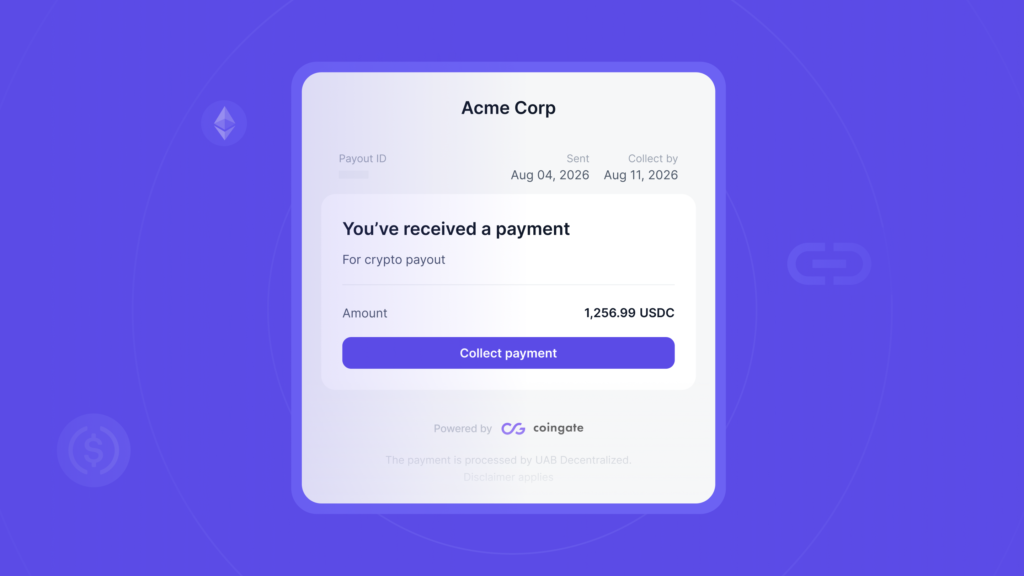
You can watch it move through its lifecycle from the dashboard.
- Pending while it waits for the recipient.
- Processing once they have confirmed and the payout is in flight.
- Completed when the crypto has landed on chain.
- Expired, canceled or failed if something stopped it. All three return your funds.
Need to pull a link back? You can cancel it while it is still pending, or while it is sitting as an unapproved draft. Cancelling refunds the amount and the fee to the balance it came from.
Once the recipient has confirmed and the link is processing, cancelling is no longer available to you, the same as any other crypto payout in flight. That is not the same as the money being gone. Compliance can still stop the payment further down the line, and if it does, you get it back.
You cannot edit a link after creating it. If a detail is wrong, cancel it while you still can and make a new one.
A quick word on compliance
You do not run any of it yourself. When the recipient collects, the wallet address they give us is checked against the network they picked and screened for sanctions and risk exposure, and the details they entered are screened as well, before anything moves on chain. A bad address is refused and they are asked for another one. If a check fails outright, the payment stops and you are refunded in full.
Worth knowing for the awkward conversation: if a payout of yours gets stopped, it is not something you can override, and there is a limit to how many addresses one recipient can try. For the wider picture of operating cleanly here, we covered it in how to run a compliant crypto payment operation.
Doing this at scale
One at a time is fine for the occasional payout. Paying fifty affiliates that way is a data-entry job, and that is what the API is for. You can create a link, list them filtered by status, read one with its full event history, and cancel one that is still open. If you are wiring payouts into your own systems more broadly, how to automate crypto payouts via API covers the wider payout surface.
Every state change sends a callback, so your system finds out a payout completed without anyone watching for it. The Payout Links API guide has the endpoints, the event payloads and how to reconcile the whole thing against your own records.
And if you want to see what the person on the other end actually gets, how to collect a Payout Link walks through their side of it.
FAQ
Do I get my money back if nobody collects?
Yes. When the link expires uncollected, the amount and every fee return to your balance, with nothing deducted.
Can I change a link after creating it?
No. Cancel it while it is still pending and create a new one. The cancellation refunds you in full, so nothing is lost but a minute.
Which currency does the recipient actually receive?
Whichever they choose when they collect, from the assets and networks we support for payouts. The amount you set is the display value, and if their choice differs from the balance that funded the link, we convert at that point. The conversion cost sits with you, not with them.
Why was my balance debited before anyone collected?
Because the funds are reserved when the link is created, not when it is collected. It is a hold rather than a charge, and you keep it unless and until a real payout goes through.
Can I send the same link to more than one person?
It is funded for one payout and tied to one email address, and the code goes to that address. Treat a link as belonging to the person you created it for.
The short version
Set an amount, pick the balance behind it, write a reason, choose an expiry, add their email, review, confirm. We hold the funds, the recipient collects on their own terms, and you only pay for real if the payout goes through.
Ready to pay someone without the back and forth? Create your first Payout Link. And if you are not with us yet, start here.
Accept crypto with CoinGate
Accept crypto with confidence using everything you need in one platform.