


Accept crypto with CoinGate
Accept crypto with confidence using everything you need in one platform.
You Received a Payout Link. Here Is How to Collect It
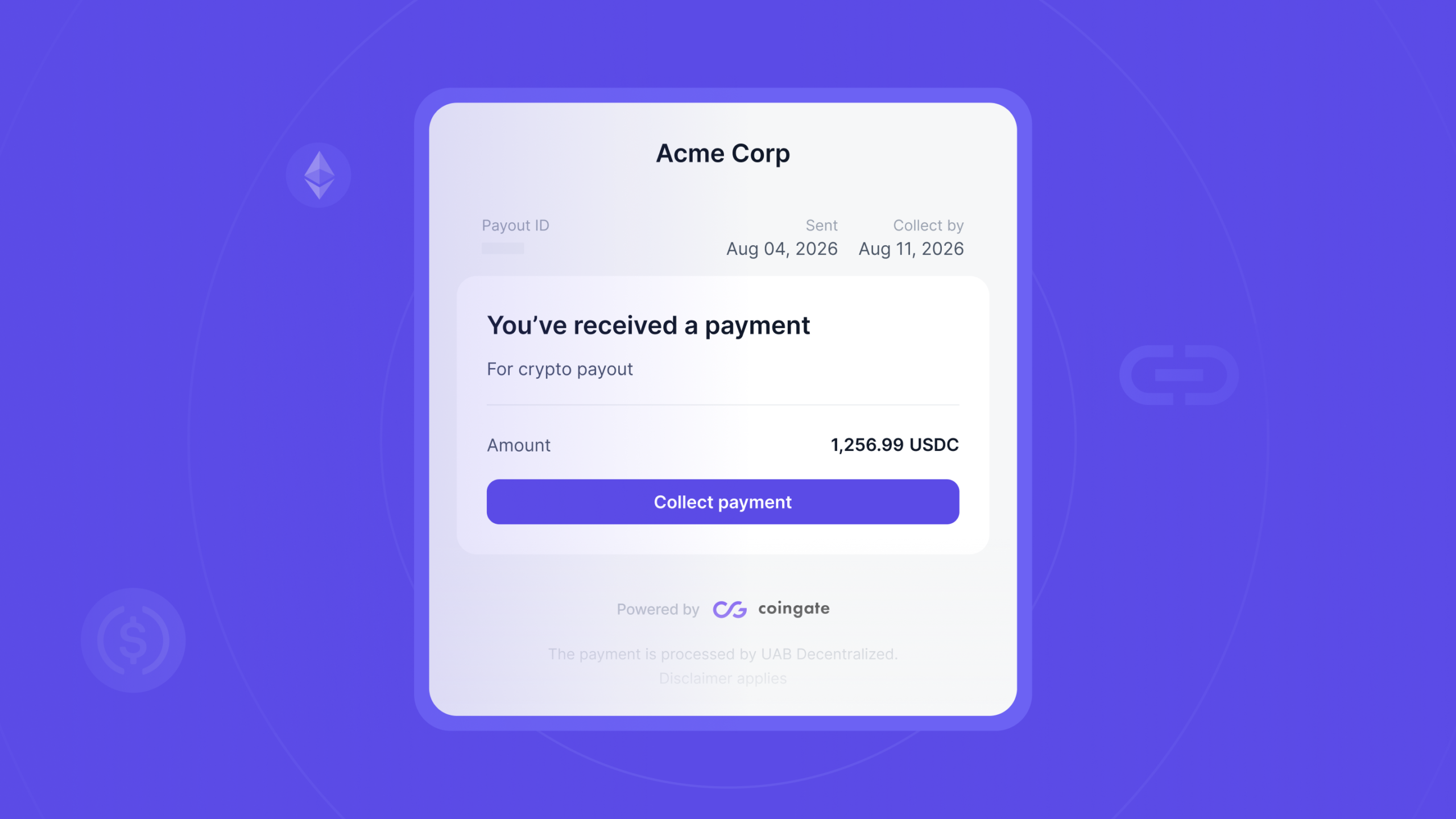
Someone is paying you in crypto, and they sent you a link. You opened it, and now a page is asking for your details and a wallet address. Is this safe? What do you actually have to do? And do you have to sign up for anything?
Let us answer the last one first, because it is the one people worry about most. You do not need a CoinGate account. You never create one, you never log in, and nothing is opened in your name. A Payout Link exists so you can take your money without joining anything. It takes a few minutes.
Two things are worth knowing before you start, because they are the real difference between this and being paid the old way. You choose what you get paid in, and on which network, rather than the sender deciding that for you. And you enter your details into our page rather than emailing them over to whoever is paying you.
Here is the whole thing, step by step.
Paying people in crypto yourself? See how the sending side works.
What you need before you start
Two things, and neither of them is an account.
- A wallet address you control. Yours, on a network you can actually access, because once a crypto payment goes through nobody can reverse it. An exchange deposit address works too, as long as it is for the exact network you pick.
- Your basic details. Your name, your date of birth, where you live, and whether you are taking this as a person or on behalf of a business. This is not the sender being nosy. It is a legal requirement for payouts like this one, and more on that below.
You will also need access to the inbox the link was sent to, which matters more than it sounds. We come back to that in step two.
Step 1: Open the link and check it is what you expected
The first screen tells you who is paying you, how much, what for, and by when. Something like “Acme Corp wants to pay you €250. Reason: Q1 affiliate payout.”
Take a second here rather than clicking straight through. Does the sender match somebody you actually expect money from? Do the amount and the reason line up with what you agreed? If anything feels off, message the person who sent it before you type a single thing.
Two checks worth doing every time, and they take five seconds each:
- Look at the address bar. A real Payout Link is served from a CoinGate address, on our dedicated payout domain,
payout.coingate.com. If the page is on some other domain that merely looks like ours, close it. - Remember what we will never ask for. No password. No private key. No seed phrase. No request to send anything first to “verify” or “unlock” your payout. If any page ever asks for one of those, it is not us. Stop.
Step 2: Confirm it is you with the emailed code
Before anything else, we send a one-time code to the email address the sender entered when they created the link, and you type it in.
This is the part that catches people out, so it is worth being clear about. You cannot change that address yourself. It belongs to the link, which is what stops a forwarded URL from becoming someone else’s money. If the link reached you at an address you cannot open, or the sender used an old one, you are not stuck. You just cannot fix it from your side. Ask them to cancel the link and send a new one to the right address, which costs them nothing.
A few practical notes. The code is valid for ten minutes, so open the link when you are ready to finish rather than in a spare moment. If it lapses you can ask for a new one after a minute, and a run of wrong attempts will also make you wait. Neither is a problem, they are just there to stop somebody guessing.
Step 3: Enter your details
Name, date of birth, where you live, and whether you are collecting as an individual or for a business. If it is a business, you will be asked for the company’s details rather than only your own.
You fill this in yourself and nobody is checking your documents. There is no upload, no selfie, no verification queue. It is a form, and then you move on.
Step 4: Pick your crypto and network, then paste your address
Now you choose what you want to receive. The link offers a set of options, and each one is a specific coin on a specific network, for example USDC on Solana or USDC on Ethereum. Pick the combination you genuinely hold a wallet for, then paste that wallet’s address.
This is the step to slow down on. Make sure the network matches your wallet. Sending the right coin on the wrong network is the most common way people lose crypto, and it is not something anyone can undo for you afterwards. Copy the address, never retype it, and read it back once before you continue.
One reassurance: the page checks that the address is valid for the network you chose before it accepts it. So a typo or a mismatched address gets bounced straight back to you rather than sending your money somewhere it cannot be recovered, and a typo does not count against you. Pasting the same address twice in quick succession does not count twice either.
Step 5: Check the amount, then confirm
Before you commit, you see the rate and the amount you will receive in the crypto you picked.
If the crypto you chose is not what the sender funded the link with, a conversion runs. Worth knowing, because people assume the opposite: the conversion cost sits with the sender, not with you. It is not taken out of your payout.
When the numbers look right, you confirm. That is the last decision you make.
What happens after you confirm
The payment does not go straight to the blockchain. First it runs through the compliance checks any regulated payout has to pass, and then it is sent.
You will see the status sitting on processing while that happens, and you can close the page. Nothing depends on you keeping it open. When it is done the page shows the payout as collected, along with the transaction ID and a link to look it up on the blockchain yourself, which is the part worth saving if you need to prove you were paid.
Occasionally a check does not pass, and the payment stops rather than going out. If that happens the money returns to the sender in full and the page tells you to get in touch with them. It is not a judgement about you and there is nothing for you to fix, but the sender is the only one who can start it again.
Why you have to give your details
Nobody enjoys typing personal information into a form, so here is the honest reason.
Payouts like this are regulated. A licensed provider has to know who is receiving funds and has to screen the transaction, under the rules usually referred to as the travel rule and anti-money-laundering law. That obligation is the same for every regulated provider in the EU, and it is part of what our MiCA licence requires of us. What you enter is used to meet those requirements. It is not used to market to you and it does not open an account in your name. Note where you are typing it, too: into the payment flow itself, rather than into a message to the business paying you.
The wallet address you give is screened automatically as well, which brings us to the one thing that occasionally goes wrong.
If your wallet address gets rejected
Sometimes the page will tell you an address cannot be used and ask for a different one.
That means the address was flagged during screening. It does not necessarily mean you did anything wrong, because an address can be flagged for reasons that have nothing to do with the person using it. Try a different wallet that you control.
One thing to know before you start pasting: there is a limit on how many addresses can be rejected before the link shuts itself down as a precaution. If that happens the link is finished, your money is returned to the sender, and you will need to ask them for a new one. So use a wallet you know is yours and that you know is clean, rather than trying whatever you can find.
What actually arrives
Quick recap of the money side, because it is where the confusion usually sits.
The figure you saw when you opened the link is the display amount, expressed in the sender’s currency. What lands in your wallet is in the crypto you chose, converted if a conversion was needed. If you would rather skip conversion entirely, pick the same currency the sender used when that option is offered. The options in the link are the ones available to you, and you can see what we support across CoinGate more broadly on the supported currencies page.
And keep an eye on the deadline. The sender picks how long the link stays open, anywhere from one to seven days, and it is shown to you on the first screen. Let it lapse and the money goes back to them automatically, so you would need to ask for another link.
FAQ
Do I need a CoinGate account?
No. You collect with an emailed code, your details and a wallet address. There is nothing to sign up for and nothing to log into. That is the entire point of a Payout Link.
Is it safe to enter my details?
The information is collected because a regulated payout legally requires it. What should make you stop is any page asking for a password, a private key or a seed phrase, or asking you to send something first. We never ask for those. If a page does, it is not us.
The code went to an email I cannot open. What now?
Ask the sender to cancel the link and create a new one for the right address. You cannot change it yourself, and cancelling costs them nothing.
Who pays the conversion cost?
The sender. If the crypto you pick is different from what funded the link, the conversion runs on their side of the payment rather than coming out of yours.
My wallet was rejected. What now?
Try a different wallet you control. If the link locks itself after repeated rejections, contact the sender and ask for a new one.
How long do I have?
Between one and seven days, whichever the sender chose, and the deadline is on the first screen. After that the money returns to them.
Can I send the payout to my exchange account?
Yes, an exchange deposit address is fine. Just make sure it is the deposit address for the exact coin and network you selected, and check whether your exchange needs anything else alongside it.
The short version
You got a link, not a chore. Check the sender and the amount, confirm the emailed code, fill in your details, pick a coin and a network you actually hold a wallet for, read the amount, confirm. No account, no password, no seed phrase, ever. A few minutes and the crypto is in your wallet.
Curious how the business side sends these in the first place? Payout Links, explained covers the concept, and how to create one is the sender’s view of the same flow.
Accept crypto with CoinGate
Accept crypto with confidence using everything you need in one platform.